
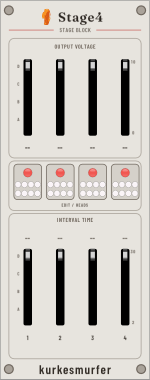
10 HP four-stage block
Stage4
Stage4 contributes four stages to the shared programming field. Add one to sixteen blocks to the right of Program, directly or across matched Glue bridges.
Sliders
| Row | Internal use | External-source use |
|---|---|---|
| Output Voltage | Sets the stage voltage before Program's range, slew, and quantization modifiers. | Selects external Program input A, B, C, or D by quartile. |
| Interval Time | Sets a normalized position inside the stage's selected time range. | Selects external Program input A, B, C, or D by quartile. |
The A–D letters beside each travel indicate the quartile mapping. Stage numbering continues left to right across adjacent blocks.
Feedback cluster
Each stage has a light cluster that shows the current edit selection and the positions of up to eight heads. Head colors are assigned nearest-first from Program: red, green, blue, yellow, magenta, cyan, orange, and white. A stopped head is dimmed.
Ownership and reordering
A Stage4 block owns both its slider values and its four stages of programming. Moving a block moves that four-stage phrase intact. Removing or inserting blocks changes the active stage count immediately.
Preset takeover
After Program recalls a preset, saved slider values become active even if the visible handles are elsewhere. Move a handle toward the active value; it takes control only after crossing that value. MIDI can either preserve this takeover behavior or move the visible handles, selected in the MIDI context menu.
Limits
- One block adds four stages.
- Sixteen reachable blocks provide the maximum 64 stages.
- Stage4 has no independent outputs; heads render the shared field.
- Its context menu contains diagnostics only.