
18 HP programming anchor
Program
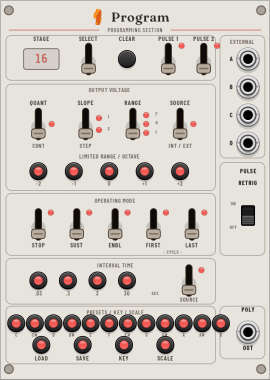
Program selects stages, changes their behavior, stores presets, receives four external sources, and collects every head's CV into one polyphonic output.
Selection and bulk editing
| Control | Behavior |
|---|---|
| Select | Move the edit selection left or right. Hold to autoscroll; selection wraps across the reachable stage chain. |
| Stage display | Shows the reachable stage count. An exclamation mark indicates a truncated or invalid chain. AL means the next gesture will edit all stages. |
| Clear | Reset all stage programming to defaults without moving voltage or time sliders. |
Hold Select while applying a modifier to edit every stage. For mouse use, choose Apply next edit to ALL stages from the context menu.
Output voltage
| Control | Down / remove | Up / add |
|---|---|---|
| Quant | Continuous voltage | Quantize to the selected key and scale at 1 V/oct |
| Slope | Reduce slew level | Add slew level, up to level 2 |
| Range | Half, 0–5 V | Full, 0–10 V |
| Source | Stage voltage slider | External A–D; slider quartile chooses the input |
The five Limited buttons select a 2 V slider span with octave offset −2 through +2. Limited is independent of the Full/Half range selection.
Operating mode
| Modifier | Effect when set |
|---|---|
| Stop | The head completes this interval and stops. A new Start continues at the following stage. |
| Sustain | The head holds this stage while its Start input remains high. |
| Enable | The head waits on entry until its Start input exceeds 5 V. |
| First / Last | Mark region boundaries used by Head's First–Last loop mode. |
Interval time and pulses
Choose one of four ranges per stage: 0.002–0.03 s, 0.02–0.3 s, 0.2–3 s, or 2–30 s. Time Source selects the Stage4 time slider or one of external inputs A–D; in external mode the time slider chooses the input quartile.
Pulse 1 and Pulse 2 flag the selected stage for the corresponding Head outputs. Pulse Retrig defaults on, inserting a brief low notch between adjacent flagged stages. Turn it off to merge adjacent stages into one gate.
Presets, key, and scale
For presets, press Load or Save and then 1–12. Presets store stage programming and slider values in the patch. Recalled slider values use takeover: a physical slider does not regain control until it crosses the stored value.
Press Key and then 1–12 for C through B. Press Scale and then 10, 11, or 12 for Major, Minor, or Chromatic.
Connections
| Port | Purpose |
|---|---|
| A–D | Four external CV sources shared by stage voltage and interval-time routing. |
| Poly Out | Every reachable head's CV; channel 1 is Head 1 nearest Program. |
Context menu
- Arm one-shot all-stage editing.
- Choose slew level 1 from 10%, 25%, or 40% of the interval.
- Choose slew level 2 from 50%, 75%, or 100% of the interval.
- Choose self-normalizing 0–10 V address scaling or fixed 0.5 V per stage.
- Slope law is currently Linear; Exponential is reserved.